PAN Card Registration in Nepal: How to Apply Online with Your NID (2026)
PAN card registration in Nepal online: get a personal PAN with your NID on IRD's new taxpayer portal, step by step with screenshots, then print the card.
If you have a national ID, PAN card registration in Nepal no longer needs a trip to a tax office. On the Inland Revenue Department's (IRD) new taxpayer portal you open Application For PPAN Registration, enter the mobile number linked to your NID, confirm the OTP and your NID number, and IRD creates your personal PAN card online, ready for you to print. Here is how to make a PAN card in Nepal, step by step, with screenshots of the official pages. You'll need your NID number: the NID card check shows how to find it. Looking up an existing PAN number instead? Use the IRD PAN search guide.
Who needs a PAN card?
Under IRD's "PAN for all" policy (सबैका लागि स्थायी लेखा नम्बर), anyone who earns income during a fiscal year, whether a salary, allowance, wages or house rent, has to take a personal PAN (IRD FAQ).
Online PAN card registration with your NID: step by step
IRD explains this route in its own video, "राष्ट्रिय परिचयपत्र नम्बरका आधारमा व्यक्तिगत स्थायी लेखा नम्बर स्वचालित रुपमा अनलाइन सिर्जना गर्ने" (creating a personal PAN online automatically from your national ID number), posted on YouTube on 21 November 2025 (IRD video). The steps below match that video and the live portal as we found it on 7 November 2026.
Step 1: Open the new taxpayer portal and choose Application For PPAN Registration
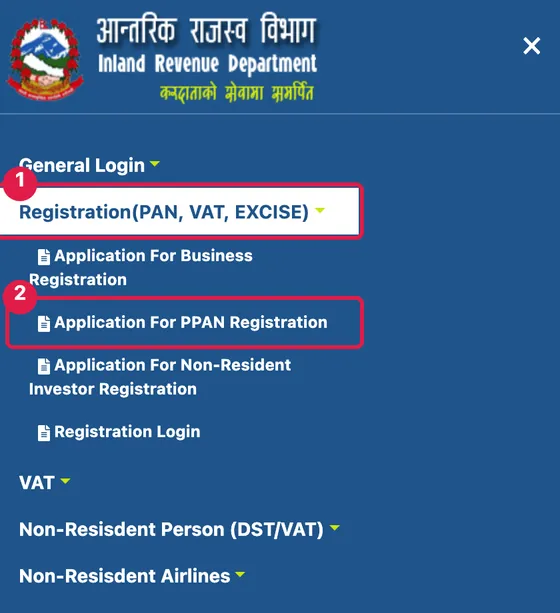
From ird.gov.np, click करदाता पोर्टल (नयाँ) (Taxpayer Portal, new), or go straight to taxpayerportalb.ird.gov.np. In the menu, click Registration(PAN, VAT, EXCISE) (1) and then Application For PPAN Registration (2).
Step 2: Enter the mobile number registered with your NID
The page reads: "If you have a National ID(NID), enter the mobile number registered in the NID system to get your PAN." Enter that number (1) and the captcha (2), then click Continue (3).
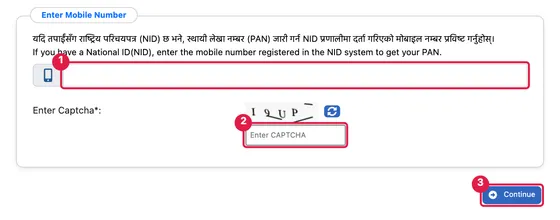
Use the number on your NID record, not just whichever phone you carry. If you've changed numbers, see the OTP question in the FAQ below.
Step 3: Type the OTP
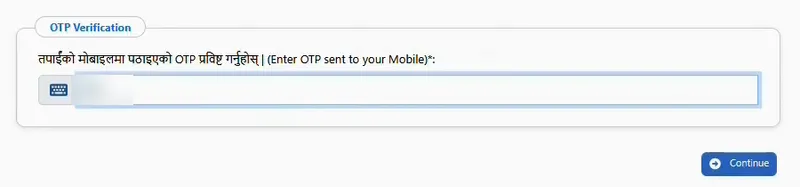
An OTP Verification box asks you to "Enter OTP sent to your Mobile". Enter the code from the SMS and click Continue.
Step 4: Choose your Inland Revenue Office and enter your NID number
Pick the Inland Revenue Office (IRO) that suits you from the IRO Name list. Under National Identification Number (NIN), tick YES for "Do you have a National Identification Number (NIN)?" and enter your NIN, then click Continue.
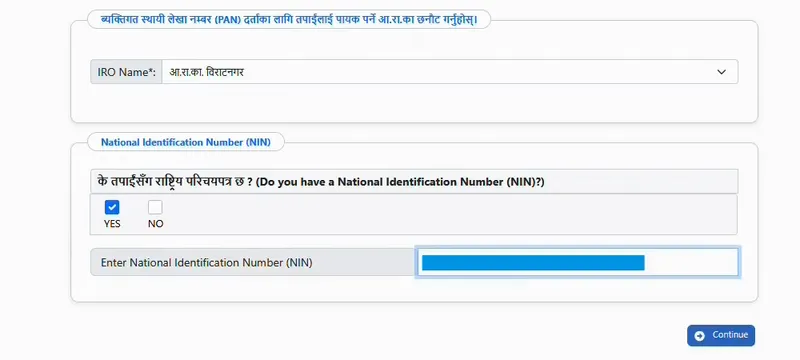
The portal then tells you which office will keep your record, for example "तपाईंको यो विवरण आ.रा.का. विराटनगर मा दर्ता हुनेछ। के तपाईं अघि बढ्न चाहनुहुन्छ?" (your details will be registered at the Biratnagar IRO; do you want to continue?). Click Yes.
Step 5: Check the form tabs
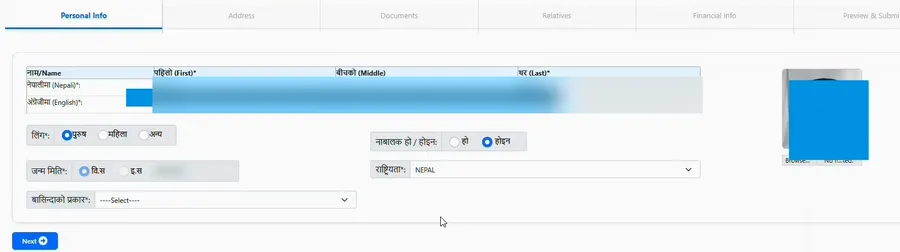
The form has six tabs: Personal Info, Address, Documents, Relatives, Financial Info and Preview & Submit. Your NID record fills in a lot of it, so your job is mostly to check the details and add anything missing:
- Personal Info: your name in Nepali and English, gender and date of birth. To type your name in Nepali, use the Nepali typing tool and type it by sound:
raam bahaadur thaapaagives राम बहादुर थापा. - Address: your permanent address, with tick boxes to reuse it as your temporary or mailing address.
- Documents: your citizenship certificate details appear here.
- Relatives: add the names of family members.
- Financial Info: your source of income (employment, investment, business, occupation or others) and, optionally, your bank account.
IRD forms use Bikram Sambat dates. The Nepali date converter checks any BS date for you.
Step 6: Preview and submit
On Preview & Submit, go through every detail once more. Tick the self-declaration that everything is true, click Submit and confirm.
Step 7: Get your PAN and print the PAN card
A success message confirms that your registration is complete and your PAN has been created. It says the PAN will reach you by mobile and email, and that you can print the card with "Print Card". Print it or save it as a PDF, and keep it with your documents.
How to print or download your PAN card
Use Print Card to print or save the card straight away (Step 7). If you lose a personal PAN card later, IRD's FAQ says you can print it again from your taxpayer login, or apply at the office that holds your PAN (IRD FAQ).
IRD PAN login: which taxpayer portal?
There are two taxpayer portals linked from ird.gov.np:
- करदाता पोर्टल (नयाँ) (new): taxpayerportalb.ird.gov.np, with Application For PPAN Registration (personal PAN with NID), Application For Business Registration, Registration Login, and returns such as VAT and income tax.
- करदाता पोर्टल (older): taxpayerportal.ird.gov.np, with Registration(PAN,VAT,EXCISE), VAT, Income Tax and e-TDS menus.
A new personal PAN with your NID is done on the new portal. That's also what people searching for "www ird gov np pan" are usually after.
Business PAN registration in Nepal
A business gets its own PAN, separate from the owner's personal PAN. On the new portal, choose Application For Business Registration. IRD's PAN forms page has separate business PAN registration and amendment forms for:
- companies
- partnership firms
- joint ventures
- NGOs, charities, cooperatives and similar bodies
- withholding (With-Holder PAN)
Your Inland Revenue Office can tell you which documents your type of business needs.
PAN office near me: IRD contacts and office hours
Your PAN record sits with the Inland Revenue Office you picked. IRD's offices page lists every office. The department's head office (ird.gov.np):
- Address: Lazimpat, Kathmandu
- Email: serviceird@ird.gov.np
- Phone: 01-5970081
- Winter hours (16 Kartik to 15 Magh): Monday to Friday, 9:00 to 4:00
- Summer hours (16 Magh to 15 Kartik): Monday to Friday, 9:00 to 5:00
- Closed on public holidays.
IRD also publishes the IRD Nepal app for Android and iOS. IRD's banner for the app lists personal PAN (PPAN) registration as one of its services.
Frequently asked questions
How do I make a PAN card in Nepal?
Can I do PAN card registration online in Nepal?
What is the full form of PAN?
Can I get a PAN without an NID?
Why am I not getting the OTP for PAN registration?
Do I need to give bank details for a PAN?
Related: IRD PAN search (check a PAN number) · NID card check (find your NID number) · License print check · Nepali typing tool (for the Nepali name field) · Nepali date converter (for BS dates)
Sources: IRD: new taxpayer portal · IRD video: personal PAN online from your NID number (21 Nov 2025) · IRD FAQ · IRD PAN forms · IRD offices · IRD older taxpayer portal · Screenshots: Hamropedia, 7 November 2026