Driving Licence Online Form in Nepal: How to Apply on DoTM's eDLVRS Portal (2026)
Driving licence online form in Nepal: apply for a new license on DoTM's eDLVRS portal step by step, with screenshots, from the NID form to the likhit exam.
You no longer fill in Nepal's driving licence online form on one national website. Each of the seven provinces now runs its own licence portal, and the Department of Transport Management (DoTM) links to all of them from edlvrs.dotm.gov.np. You pick your province, open New Driving License (नयाँ सवारी चालक अनुमतिपत्र) and register with your national ID. Below is the whole online driving license registration form in Nepal, one screen at a time, with screenshots from the live portal, followed by what happens to your application after you send it. Renewals and the other licence services are summed up at the end.
Before you start: what you need
Have these ready before you open the online license form:
- Your NID number. Don't know it? Look it up with the NID card check.
- A photo or PDF of your NID or of your NID registration form, clear and under 2 MB.
- A mobile number registered in your own name. Sort this out first if it isn't, because the OTP only goes to that number.
- An email address that is yours.
Step 1: Open edlvrs.dotm.gov.np and choose your province
DoTM's page edlvrs.dotm.gov.np tells you to "choose your province, then the service you need. Each link opens that province's own portal." These are the seven driving licence portals:
| Province | Driving licence portal |
|---|---|
| Koshi | edlvrs.koshi.gov.np/edl |
| Madhesh | edlvrs.madhesh.gov.np/edl |
| Bagmati | edlvrs.bagamati.gov.np/edl |
| Gandaki | edlvrs.gandaki.gov.np/edl |
| Lumbini | edlvrs.lumbini.gov.np/edl |
| Karnali | edlvrs.karnali.gov.np/edl |
| Sudurpashchim | edlvrs.sudurpashchim.gov.np/edl |
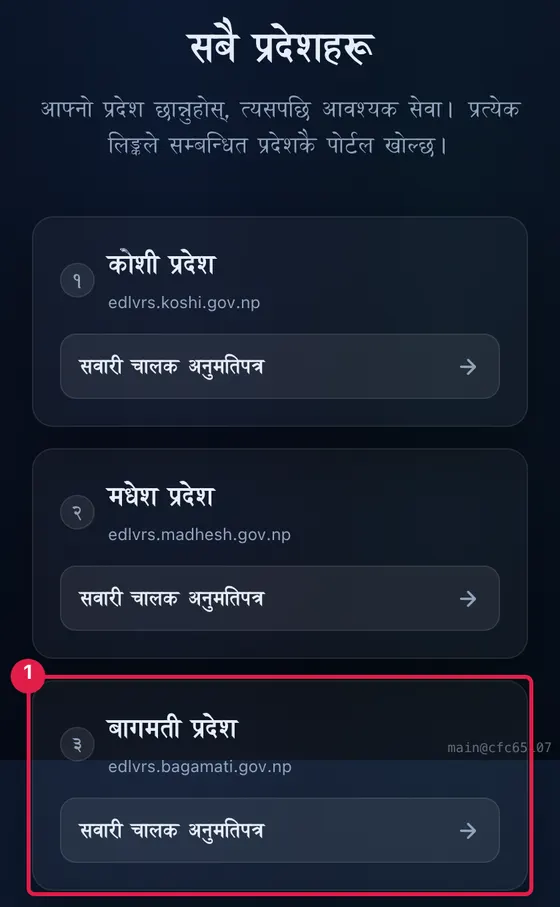
We took the screenshots on the Bagmati portal on 7 November 2026. The Koshi portal has the same services and the same steps.
Step 2: Choose New Driving License (the new license form)
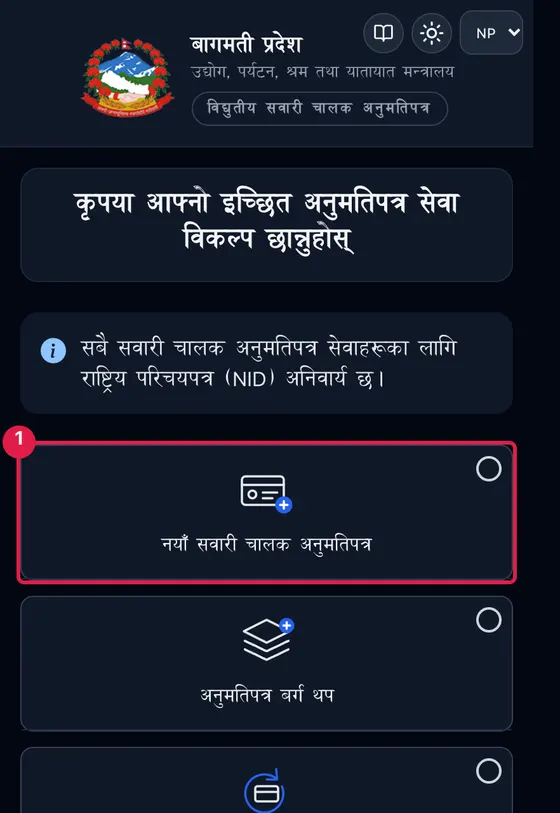
Your province portal opens with a list of licence services. Choose नयाँ सवारी चालक अनुमतिपत्र (New Driving License). The EN/NP switch at the top changes the language.
Step 3: Choose how to register
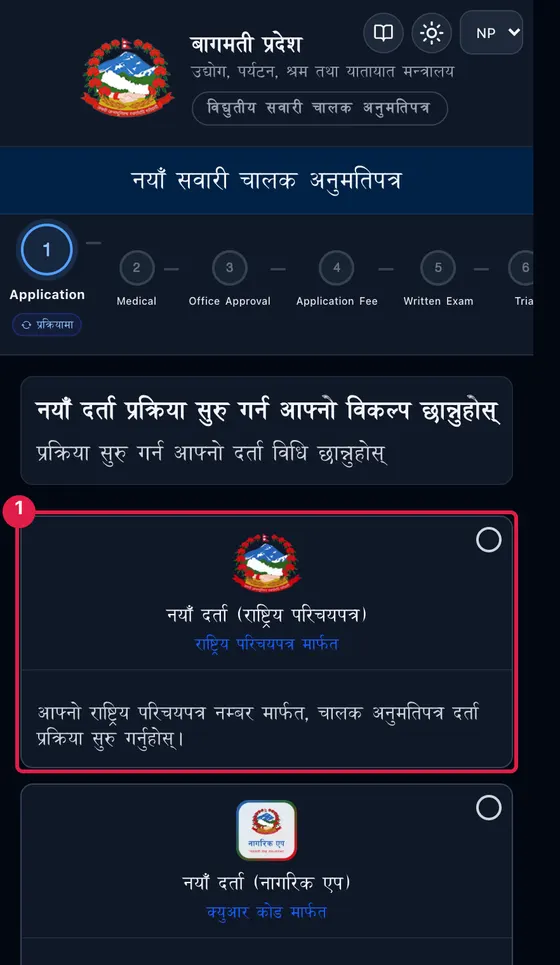
Next the portal asks how you want to start. There are four options:
- नयाँ दर्ता (राष्ट्रिय परिचयपत्र): register with your NID number. Most Nepali applicants choose this one.
- नयाँ दर्ता (नागरिक एप): scan a QR code in the Nagarik App.
- विदेशी (foreigners): use a passport number or another national identity document.
- कूटनीतिज्ञ (diplomats): apply with a passport, visa, diplomatic ID, consular recommendation and a licence from your home country. The portal says diplomats skip the written exam, the trial and the fee.
Step 4: Fill in the NID form
The form reminds you that you need a valid NID number and a mobile number registered in your own name before you can apply for a new driving licence. Then it asks for:
- Your NID number (राष्ट्रिय परिचय पत्र नं.). Pick the format printed on your DoNIDCR document,
000-000-000-0or000-000-0000. - A photo of your NID or NID registration form: a clear scan as an image or PDF, 2 MB at most.
- Your mobile number.
- Your email.
- Then click जारी राख्नुहोस् (Continue).
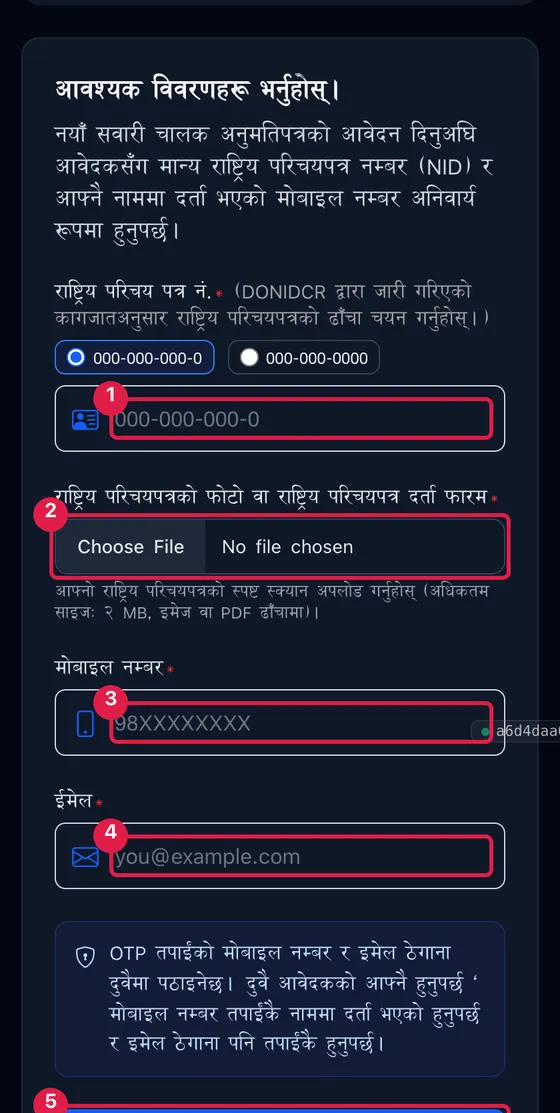
You then get an OTP on your mobile and in your email, and the portal insists that both belong to you. A relative's phone or an agent's email address won't do.
What happens after you submit: the 8 stages
The top of the form shows the eight stages every new licence passes through, in order. Each one reads प्रक्रियामा (in process) until it is complete.
- Application: the online form you have just sent.
- Medical: your medical examination.
- Office Approval: your transport office approves the application.
- Application Fee: you pay the application fee.
- Written Exam: the likhit exam (लिखित परीक्षा). DoTM publishes the official question sets for the category B and category AK written exams (2082-83), so you can practise on the real questions.
- Trial: the driving test.
- License Fee: you pay the licence fee.
- License Generation: your licence is issued.
Once stage 8 is done, your smart card still has to be printed. Our license print check guide shows how to find out when it is ready to collect.
Other licence services on the same portal
After you have your licence, the same province portal covers everything else:
- Renewal (अनुमतिपत्र नवीकरण) runs through five stages: Application, Medical, Office Approval, Renewal Fee and License Renewed. There is also renewal with duplicate (प्रतिलिपि सहित नवीकरण) if you want a new card at the same time. What renewal asks for, and the late-renewal rules, are in the questions below.
- Add Category (अनुमतिपत्र बर्ग थप) puts another vehicle category on your licence, in eight stages that end with Add Fee and Add Category.
- Duplicate Request (अनुमतिपत्र प्रतिलिपि अनुरोध) replaces a lost or damaged card.
- Retest (पुनः परीक्षण), for a new licence or an added category, is for when you failed the written exam or the trial.
- Correction (लाइसेन्स सच्याउने आवेदन) fixes wrong details on your licence.
- Driving License Details (सवारी चालक अनुमतिपत्र विवरण) shows your licence record once you enter your full name, licence number and date of birth in AD and confirm an OTP. The portal limits this to twice a day.
Frequently asked questions
How do I fill the driving licence online form in Nepal?
Is NID compulsory for a driving licence in Nepal?
Which website is the DoTM online form? Is it still applydl.dotm.gov.np?
How do I renew my driving licence online?
What happens if my licence expired more than 90 days ago?
What is the likhit exam?
Can I apply for a bike licence online?
How do I check my driving licence application status?
Related: License print check · NID card check (find your NID number) · Nepali date converter (date of birth in AD) · PAN card registration
Sources: DoTM: eDLVRS province portals · Bagmati Province driving licence portal (new licence, renewal, tracking and licence details pages) · Koshi Province driving licence portal · DoTM: category B written exam questions 2082-83 · DoTM: category AK written exam questions 2082-83 · Screenshots: Hamropedia, 7 November 2026