NID Card Check in Nepal: Find Your NID Number, Card Status and eNID (2026)
NID card check in Nepal: find your NID number, check card status and download your eNID on the official portal. Why citizenship number no longer works.
Every NID card check in Nepal now happens on one official site: the Citizen Portal of the Department of National ID and Civil Registration (DoNIDCR), citizenportal.donidcr.gov.np. From your citizenship details it shows your NID number (NIN) and lets you download your eNID. It also tells you whether your plastic NID card has been printed, and it takes the online fee if you need a replacement. The big change in 2026 is that the portal no longer searches by citizenship number, so this guide shows exactly what it asks for instead, screen by screen.
राष्ट्रिय परिचयपत्र (rastriya parichaya patra) is the national identity card's name in Nepali.
Quick answer: which NID check do you need?
| You want to | Where | What you need |
|---|---|---|
| Find your NID number (NIN) | Citizen Portal → Download eNID | Full name in Nepali and English, date of birth (BS), citizenship issue date, then an OTP on your NID mobile |
| NID card download (digital eNID PDF) | Citizen Portal → Download eNID | The same as above |
| Check if your NID card is printed | Citizen Portal → NID Card Status | Your request number (RSN) or your NIN |
| Get your NID number without internet | SMS to 30001 | N <space> application number |
None of the portal checks costs anything. Steer clear of Facebook pages or apps that want money or your OTP "to check your NID".
National identity card check by citizenship number: does it still work?
Lots of people still look for an NID check by citizenship number, and older guides still say to type it in. The current portal doesn't ask for it. According to DoNIDCR's own user manual (June 2026), the form wants (eNID user manual, PDF):
- your full name in Nepali, as it appears on your NID record,
- your full name in English,
- your date of birth in Bikram Sambat (BS),
- your citizenship issue date,
- a captcha.
You won't find a citizenship-number field. Even the portal's old "check national ID number" link now opens this eNID form. Your citizenship certificate is still what you need, though: copy the name, date of birth and issue date from it exactly.
Two things catch people out:
- The Nepali name has to be in Nepali Unicode, not Preeti. No Nepali keyboard? Type your name with English letters in the free Nepali typing tool and paste the result.
raam bahaadur, for example, gives राम बहादुर (aamakes ा). - Both dates are BS dates. If you only know one in AD, convert it first with the Nepali date converter.
NID card download: find your NID number and download your eNID
The steps below follow DoNIDCR's eNID user manual. The eNID download gives you a provisional digital NID, a password-protected PDF with your photo, your NID number and a QR code. DoNIDCR launched the service on 4 Asar 2083 (18 June 2026) (DoNIDCR notice).
Every step has a screenshot. We took ours on 6 November 2026 using sample details (an invented name and dates); the screens after the OTP are from DoNIDCR's own manual, with personal details blurred.
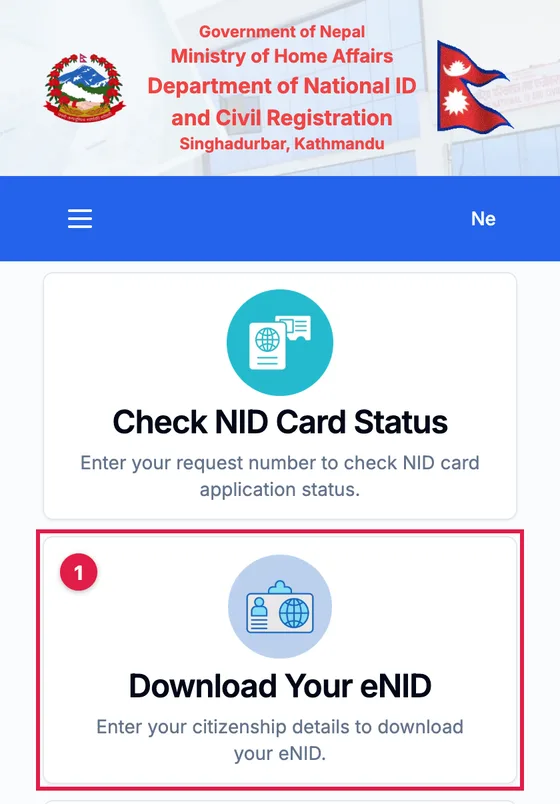
Step 1: Open the Citizen Portal and click Download Your eNID
Open citizenportal.donidcr.gov.np. The En and Ne buttons at the top right switch between English and Nepali. Click the Download Your eNID box (eNID डाउनलोड).
Step 2: Fill in your citizenship details and click Search
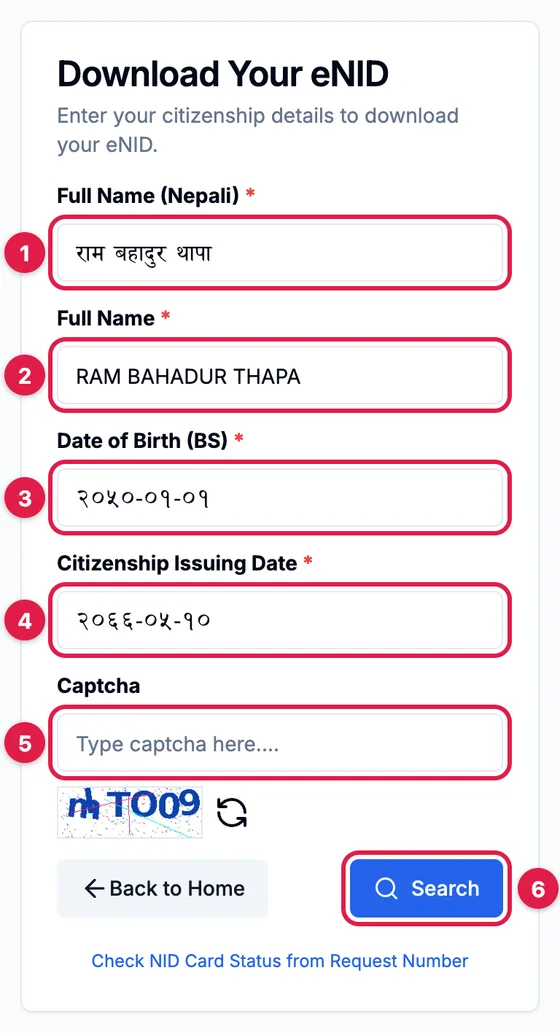
Copy every detail exactly as it is on your citizenship certificate:
- Full Name (Nepali): in Nepali Unicode, as on your NID record.
- Full Name: in English, in capital letters.
- Date of Birth (BS): year-month-day, such as 2050-01-01. English digits are fine; the portal shows them in Nepali digits.
- Citizenship Issuing Date: also BS, in the same format.
- Captcha: type the letters from the picture, or click the arrows for a new picture if you can't read it.
- Click Search (खोज्नुहोस्).
Step 3: Enter the OTP from the SMS
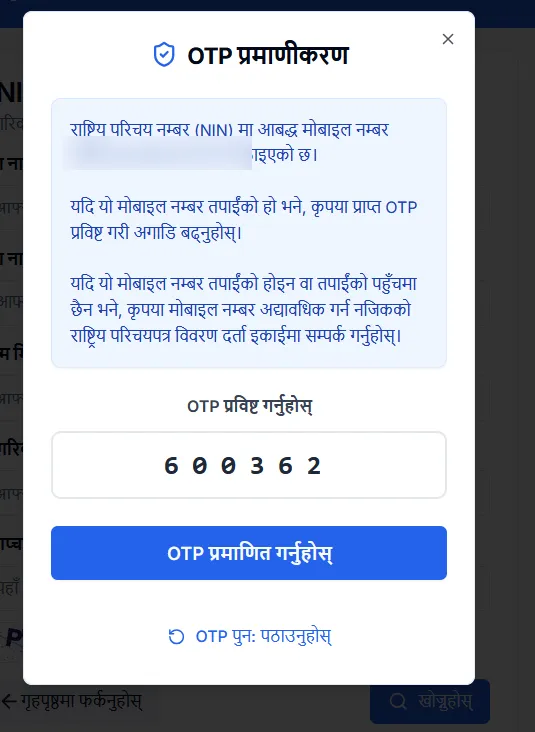
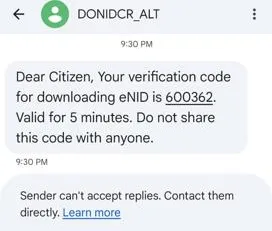
A box pops up and a 6-digit OTP goes by SMS to the mobile number on your NID. The box shows that number with most digits hidden, so you know which phone to look at. The text comes from DONIDCR_ALT and the code lasts 5 minutes. Enter it and click the verify button (OTP प्रमाणित गर्नुहोस्). Nothing arrived? Wait out the short countdown, then click the resend link (OTP पुनः पठाउनुहोस्).
Step 4: See your NID number and download your eNID
Your NID number appears at the top of a box, formatted XXX-XXX-XXX-X (10 digits), next to your photo, name, date of birth and permanent address. That completes your NID number check, so write the number down. Then click Download card (कार्ड डाउनलोड गर्नुहोस्) to save the eNID as a password-protected PDF.
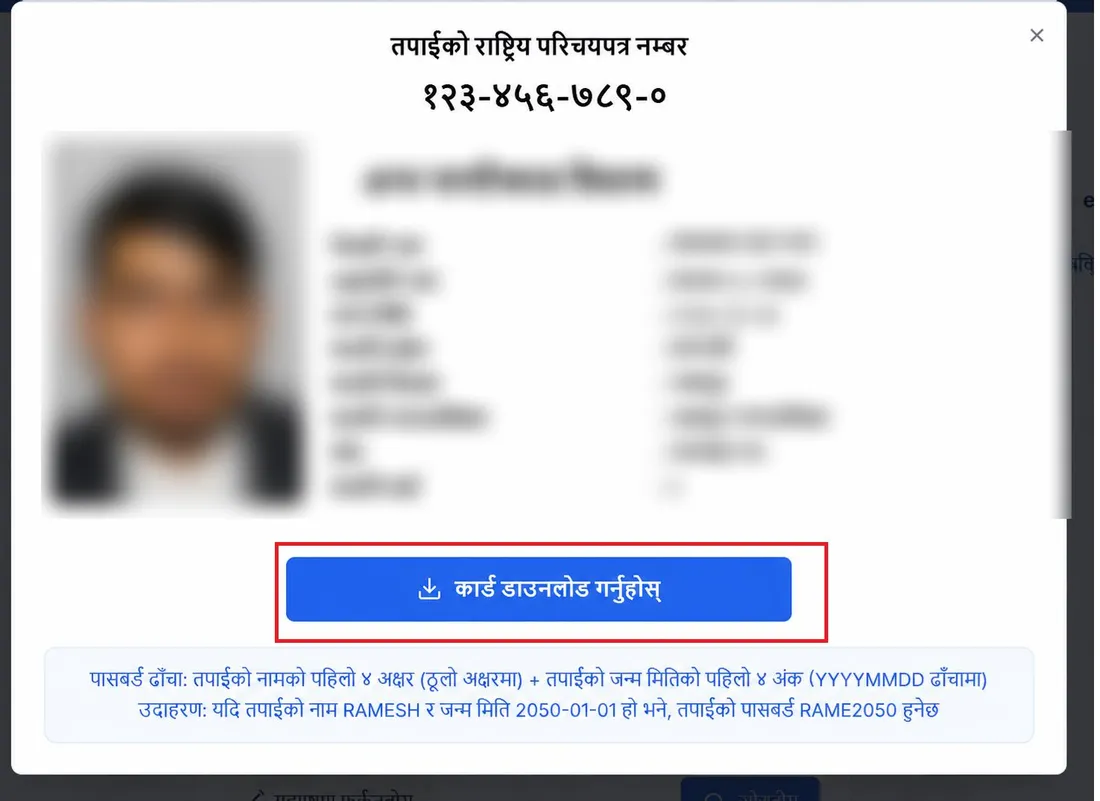
Step 5: Open the PDF with your password
The PDF asks for a password when you open it: the first four letters of your full name in English, in capitals, then the first four digits of your date of birth in BS (the year). The result box repeats this rule.
| Name in English | Date of birth (BS) | Password |
|---|---|---|
| RAMESH | 2050-01-01 | RAME2050 |
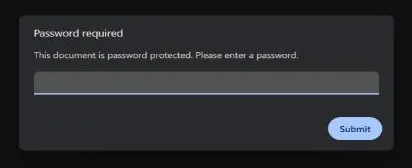
This example is the one in the official manual. Keep the PDF somewhere safe, such as Google Drive or a printout. Any phone QR scanner can read its QR code to check it.
No OTP? Your mobile number isn't linked to your NID
The OTP can only reach the mobile number on your NID record. If you registered without a number, or you've changed numbers since, the manual tells you to update your mobile number at your nearest NID registration unit. You won't need to give your photo, fingerprints or iris again.
Can you use the eNID?
DoNIDCR's notice asks government bodies and organisations that used to take a printed NID number slip from the Citizen Portal to scan the eNID's QR code and match it with your documents (notice of 4 Asar 2083). Take your citizenship certificate too. The department describes the eNID as a provisional NID.
NID card status and print check: is my card printed?
Your NID number and your plastic NID card are two different things, and the number can come long before the card is printed. To do an NID status check for the card:
- Open the Citizen Portal and click NID Card Status (राष्ट्रिय परिचयपत्र अवस्था).
- Enter either your request number (RSN), the 16-digit application number you got when you registered, or your NID number (XXX-XXX-XXX-X).
- Complete the captcha and click Search.
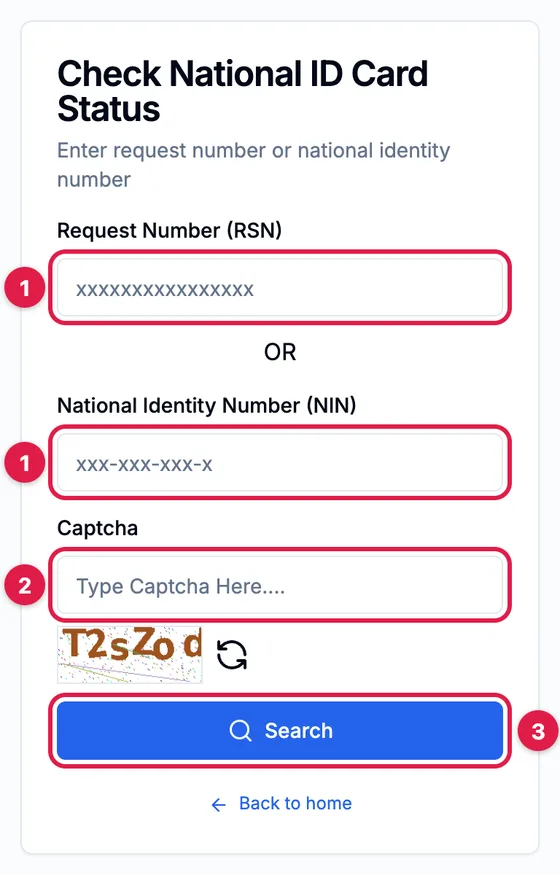
Once your card is printed, DoNIDCR texts you that it is ready to collect. You collect it from the place where you registered your details (who can collect it is in the questions below).
NID number help: phone, Viber and email
Registered but never received your number? DoNIDCR's FAQ gives these contacts (the SMS check is in the questions below):
- Viber or WhatsApp: 9851316034 or 9851316035.
- Phone: 9847346412 or 01-4200014, plus a call centre for NID problems, 01-5970449.
- Toll-free: 1147 (listed on the DoNIDCR homepage).
- Email: nid@donidcr.gov.np (NID branch) or gunaso@donidcr.gov.np (complaints).
DoNIDCR's office in Singha Durbar, Kathmandu, opens Monday to Friday, 9:00 to 4:00 in winter (16 Kartik to 15 Magh) and 9:00 to 5:00 for the rest of the year (donidcr.gov.np).
November 2026: delays for NID numbers issued after 1 Asoj
On 17 Kartik 2083 (3 November 2026) DoNIDCR put out a notice for people whose NID number was issued after 1 Asoj 2083 (17 September 2026). New records are checked by a fingerprint-matching system (ABIS), and its limited capacity has held up the verification of these records. The department says the capacity upgrade is nearly finished and should be done within about two weeks of the notice (DoNIDCR notice).
What this means for you:
- Registration stations are still registering people and issuing new NID numbers.
- Passport, banking and financial services and driving licence services carry on even if your record isn't verified yet. The notice says so after complaints about driving licence offices.
- If an office turns you away because of the delay, show them the notice.
Don't have an NID yet? NID pre-enrollment and registration
- Who can apply: anyone 16 or older with a Nepali citizenship certificate. Minors, non-resident Nepalis and foreigners living in Nepal will come in a later phase.
- Where: your District Administration Office, an Area Administration Office with a registration station, or a registration campaign in your ward. You can start the form online through DoNIDCR's NID online application (pre-enrollment), but you still have to go to a station for your photo, all ten fingerprints, iris scan and signature.
- Documents: your original citizenship certificate. Add a migration certificate if your permanent address differs from the one on your citizenship, and, if you are married and your spouse's name isn't on your citizenship, your marriage registration or relationship certificate. If your citizenship doesn't show your date of birth, bring an official document that does (birth registration, academic certificate, passport or pension card). Stations take clear originals only, not photocopies.
- Photo: no make-up, hat, cap or burqa.
- Your number: the NID number is a unique 10-digit number. A District or Area Administration Office station gives it to you on the spot; after a ward campaign it arrives later by SMS.
Lost card, damaged card or wrong details
- Wrong details: apply at the registration station of your District or Area Administration Office. Correcting your details doesn't change your NID number.
- Lost or damaged card: apply at the same office and give the reason, and they issue a copy (प्रतिलिपि). The fee is Rs 500 under rule 13(3) of the National ID and Registration Rules, 2077. You can pay online on the Citizen Portal under NID Card Replacement Payment by entering your NID number, mobile number and full name in English and Nepali and choosing an appointment office. The FAQ also allows payment at any Rastriya Banijya Bank branch: office code 314013501, revenue heading 14229, account number 1000100200010000.
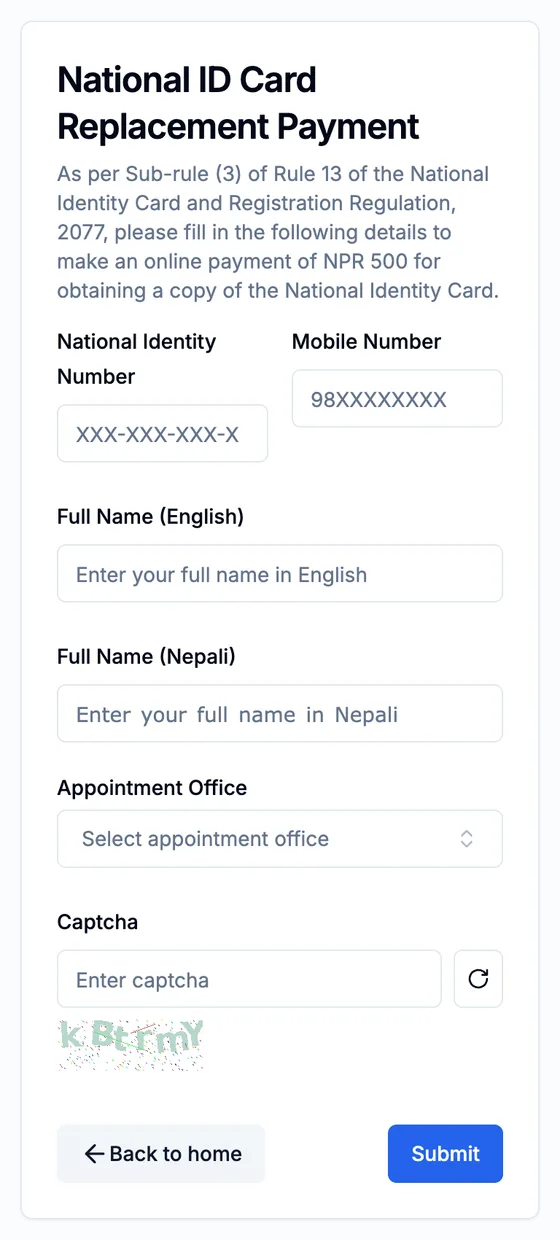
Keep your NID number safe
- Stick to the
.gov.npsites above. None of the portal checks charges a fee. - Never give anyone your OTP. DoNIDCR staff don't need it, and no one can "speed up" your card for money.
- Don't post a photo of your eNID or your NID number in Facebook groups or comments.
Frequently asked questions
How can I check my NID number in Nepal?
How do I download my NID card?
Can I check my national identity card by citizenship number?
How do I check if my NID card is printed?
What is the eNID password?
Can I check my NID number by SMS?
Can I check my NID number with my mobile number or name only?
Why am I not getting the OTP?
How many digits is the NID number in Nepal?
Can someone else collect my NID card for me?
Do I need an NID number for a passport?
Related: License print check (is your smart driving license printed?) · Nepali typing tool (for the Nepali name field) · Nepali date converter (for BS dates) · How to type in Nepali
Sources: DoNIDCR Citizen Portal · DoNIDCR eNID user manual (PDF) · DoNIDCR notice: eNID service starts, 4 Asar 2083 · DoNIDCR notice on NID services, 17 Kartik 2083 · DoNIDCR FAQ: national identity card · DoNIDCR homepage (toll-free 1147, office hours) · NID online application (pre-enrollment)