NOC Nepal 2026: How to Apply for NOC Online, Documents, Fee and Status
NOC Nepal: how to apply for NOC online, step by step with real screenshots. Who can get a NOC, documents by level, the NRs 2,000 fee and status check.
Before your bank will send tuition or living costs abroad, you need a No Objection Certificate (अनापत्ति पत्र), and in 2026 you get it through NOC online, the process most students search for as NOC Nepal. It all happens on the government portal noc.moest.gov.np, run by the Ministry of Education and Sports (formerly the Ministry of Education, Science and Technology). You register with an NTC mobile number, fill in your citizenship, passport and study details, upload your documents, and pay the NRs 2,000 fee once the ministry has verified your application. Then you download the NOC from the portal. This guide goes through every screen of the form with real screenshots, and explains what changed this year.
NOC Nepal: what changed in 2026
- New ministry name. The portal now says Ministry of Education and Sports, at the same address, noc.moest.gov.np.
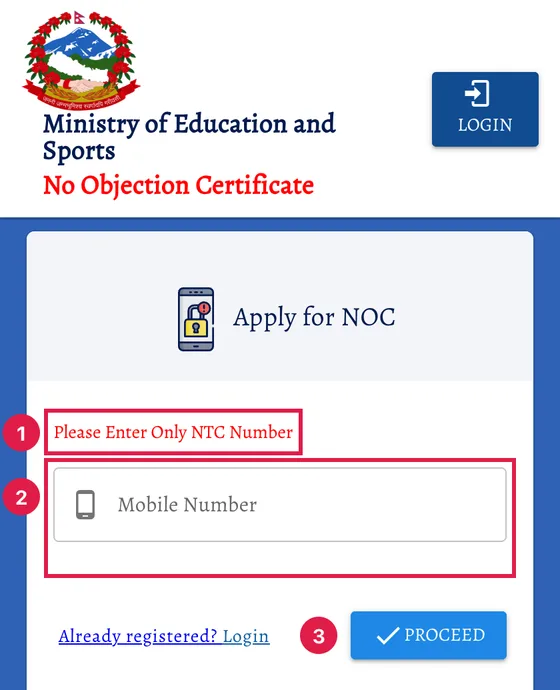
- NTC numbers only. The apply box reads "Please Enter Only NTC Number", so register with a Nepal Telecom mobile rather than Ncell.
- Fully online. A ministry notice of 4 Bhadau 2083 (20 August 2026) says you no longer have to visit the office to apply. Students whose citizenship and academic details match in the government's records ("DOB Verified") can get the NOC without any visit; everyone else is asked to come in person, and the portal tells each student which group they are in (MoEST notice, on noc.moest.gov.np).
- TU and KU degrees verified automatically. Since an agreement with Tribhuvan University on 4 Baisakh 2083 (17 April 2026), the portal connects to TU and Kathmandu University, so their certificates are checked online, and the fee is collected online too (Edusanjal, 19 April 2026).
- A warning to consultancies. The same notice tells consultancies to stop spreading wrong information about the NOC and to stop sending students to the office without reason.
- Bigger changes are still only proposals. In April 2026 the government proposed reshaping the NOC, for example by approving foreign exchange only for "priority" subjects. Nothing of this is in force (The PIE News, 7 April 2026).
What the NOC is for
The portal describes it as "a No Objection Certificate granted by Government of Nepal for the Nepalese student to study abroad". You'll find the NOC full form and the NOC meaning in Nepali in the questions below. In practice:
- Your bank needs it before it transfers tuition or living costs abroad, or changes rupees into foreign currency for your studies.
- It's about money, not your visa. The education ministry issues it, not an embassy, and it's your bank that asks to see it.
"NOC letter" and "NOC certificate" both mean the same thing: the certificate you download from the portal.
Who can get a NOC, and who can't
The portal's FAQ sets these rules:
- Diplomas have to last at least 2 years. Graduate certificates and postgraduate diplomas of 1 year taken after a bachelor's degree are accepted.
- Medicine, nursing and other regulated subjects may need a pre-approval or licence first, for example from the Medical Education Commission, NHPC or the Nursing Council.
The courses and countries that can't get a NOC, and the rule for language courses, are in the questions below. Check your course against the FAQ on noc.moest.gov.np before you pay any deposit.
NOC documents required
Scan everything clearly before you begin, and keep each file under 5 MB. The portal lists the documents by level:
| Your level abroad | Documents |
|---|---|
| Bachelor's degree (3 years or more) | Citizenship; +2, PCL or diploma transcript; offer, acceptance or invitation letter, I-20 or CoA stating subject, level and duration; invoice; equivalence letter if you studied abroad |
| Master's degree | Citizenship; bachelor's transcript; offer letter or I-20; invoice; council licence for engineering, medical, nursing or other professional degrees; equivalence letter and degree certificate if you studied abroad |
| Graduate certificate / PG diploma (1 year) | Citizenship; bachelor's transcript; offer letter or I-20; invoice; equivalence letter if you studied abroad |
| Diploma / advanced diploma (2 years or more) | Citizenship; +2 or PCL transcript; offer letter or I-20; invoice; equivalence letter if you studied abroad; copy of any previous NOC |
| Bachelor of Nursing | Citizenship; PCL Nursing or +2 Biology transcript; offer letter; invoice; Nursing Council licence (for PCL Nursing) |
A few countries ask for more: an English test certificate for New Zealand, and for a bachelor's in South Korea, the university's business registration certificate. Pilot training needs a CAAN pre-approval.
Already studying abroad and need a NOC to send money? The portal then asks for your citizenship, academic certificate, your guardian's citizenship, your old NOC, passport and visa copies, the departure and arrival stamps in your passport, a bonafide letter from your university, your enrolment or offer letter, and an invoice.
NOC online form: how to apply, step by step
The form has eight parts, from your mobile number to the final review. Apart from the first one, the screenshots come from a real application with personal details blurred. They were taken before the ministry was renamed, so they still show the old name (Ministry of Education, Science and Technology), but the screens haven't otherwise changed. The first screenshot shows the portal as it looked on 6 November 2026.
Step 1: Register with an NTC mobile number
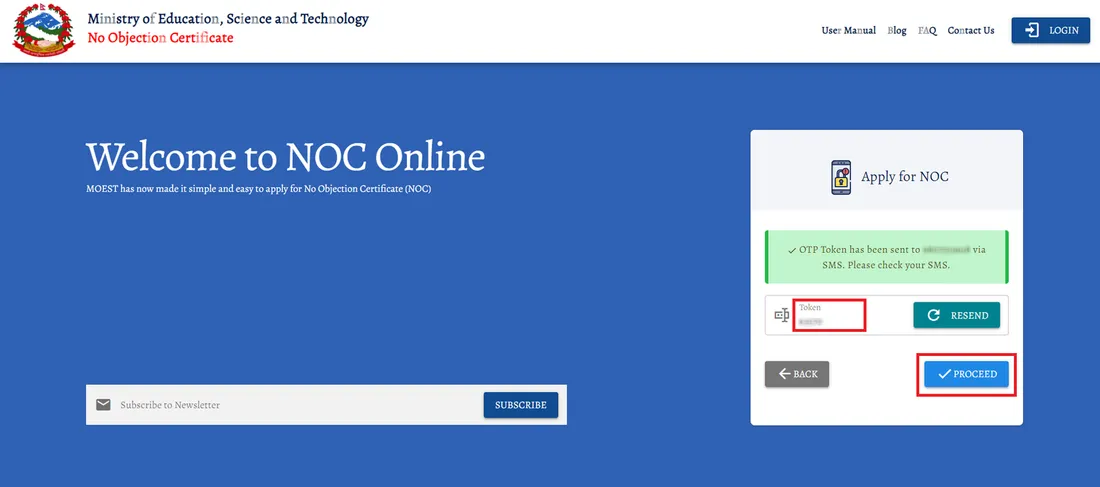
Open noc.moest.gov.np. In the Apply for NOC box, note the line Please Enter Only NTC Number (1), enter your Nepal Telecom mobile number (2) and click Proceed (3). A one-time token arrives by SMS; enter it to verify the number. Stick with this number from now on, because your application is tied to it.
Step 2: Create a password
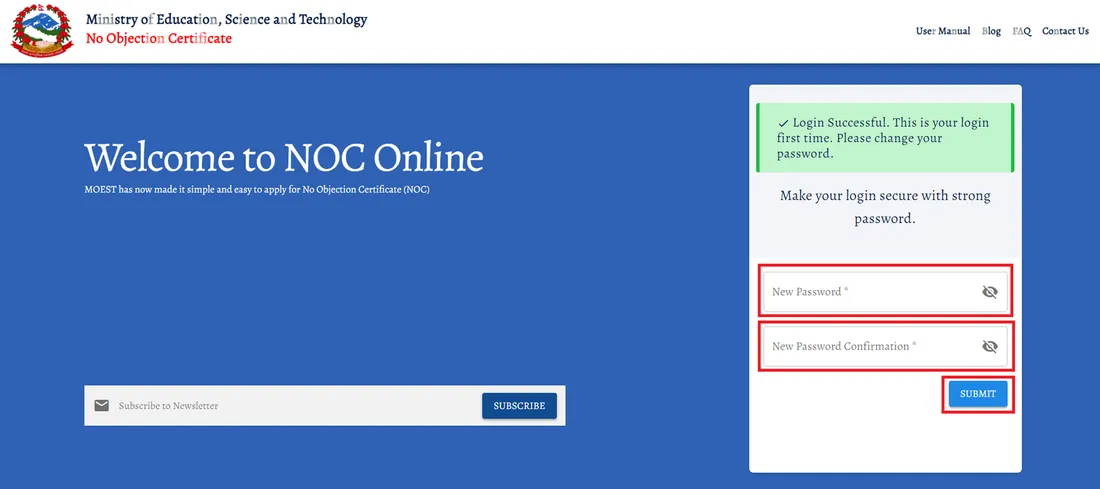
New users set a password, type it twice and click Submit. From then on you log in with your mobile number and this password.
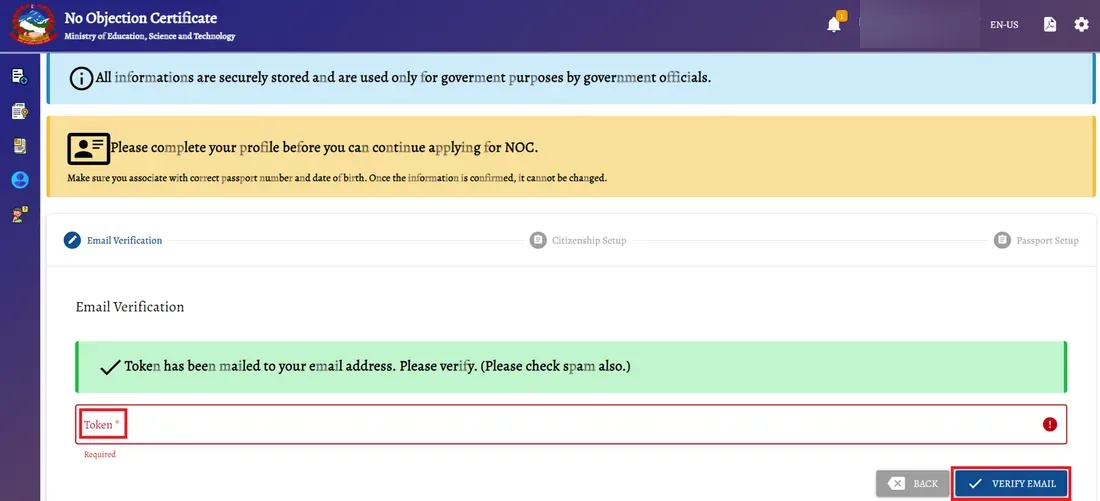
Step 3: Verify your email
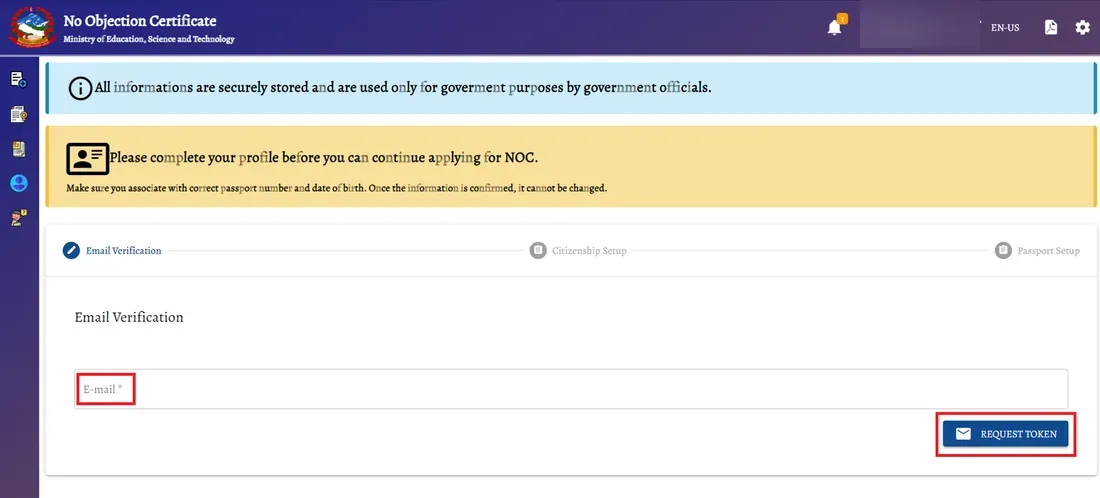
Type your personal email, click Request Token, then paste in the token from your inbox (look in spam too) and click Verify Email.
Step 4: Citizenship details
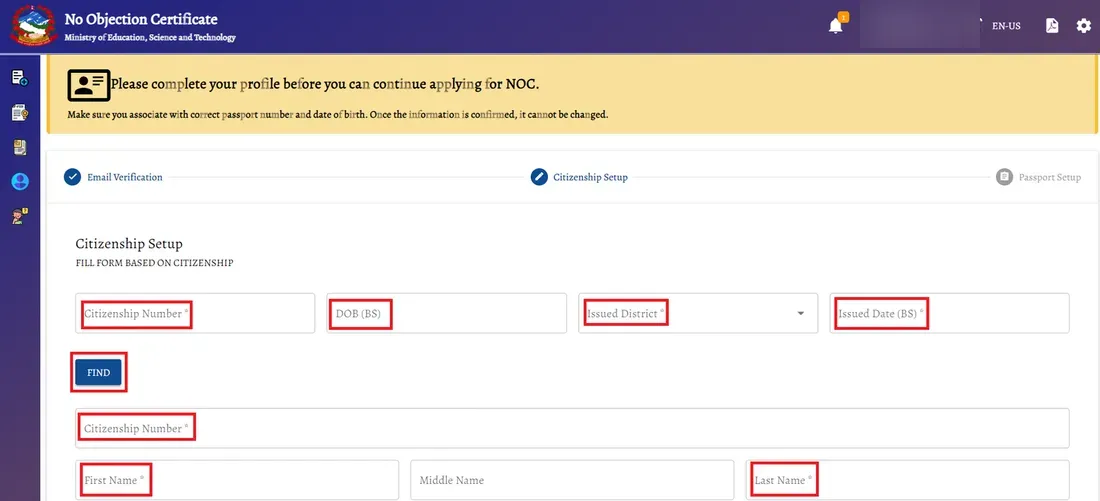
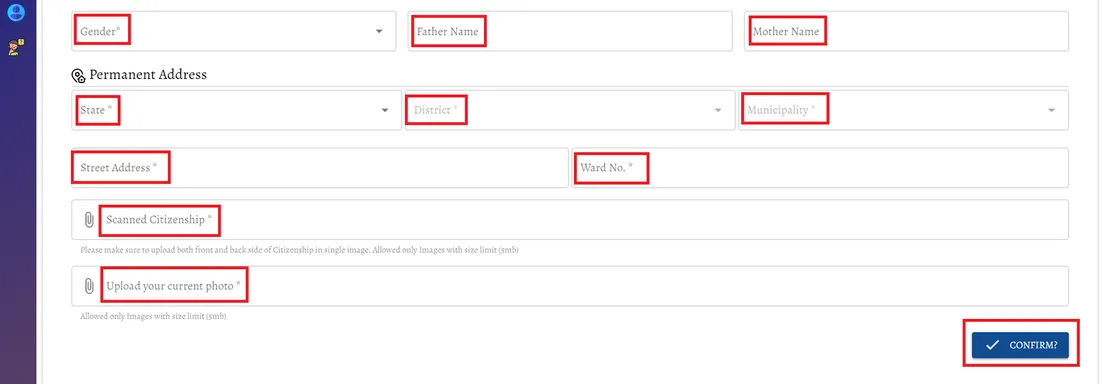
Enter your citizenship number, date of birth (BS), issuing district and issue date exactly as they appear on your certificate, then click Find. Add your name, gender, parents' names and permanent address, and upload your citizenship scan (front and back in one image) and a photo. The government's records are checked against these details, so copy them exactly. The Nepali date converter helps if you need to switch a date between BS and AD.
Step 5: Passport details
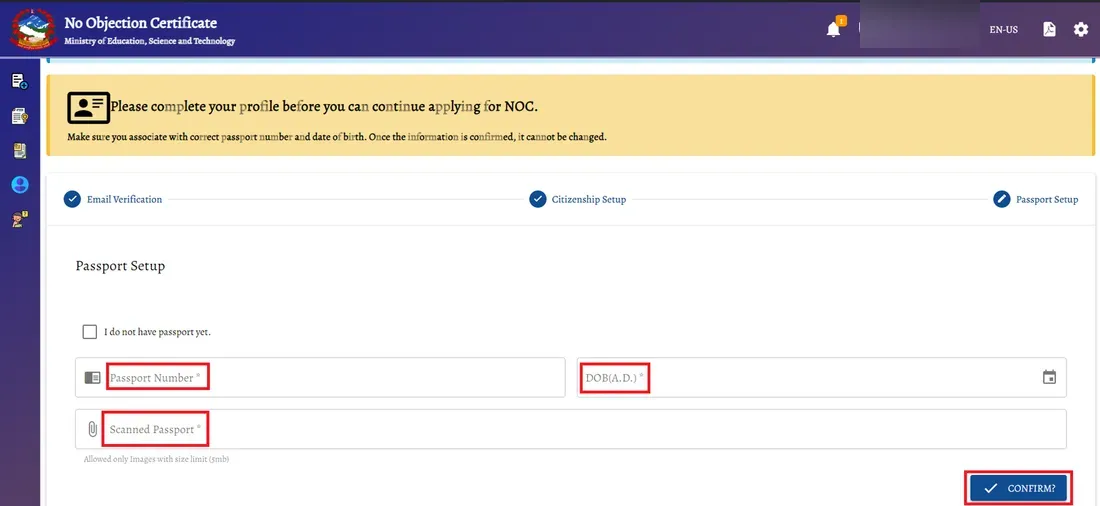
Enter your passport number and date of birth (AD) and upload a scan. If you don't have a passport yet, tick I do not have passport yet. Then click Confirm.
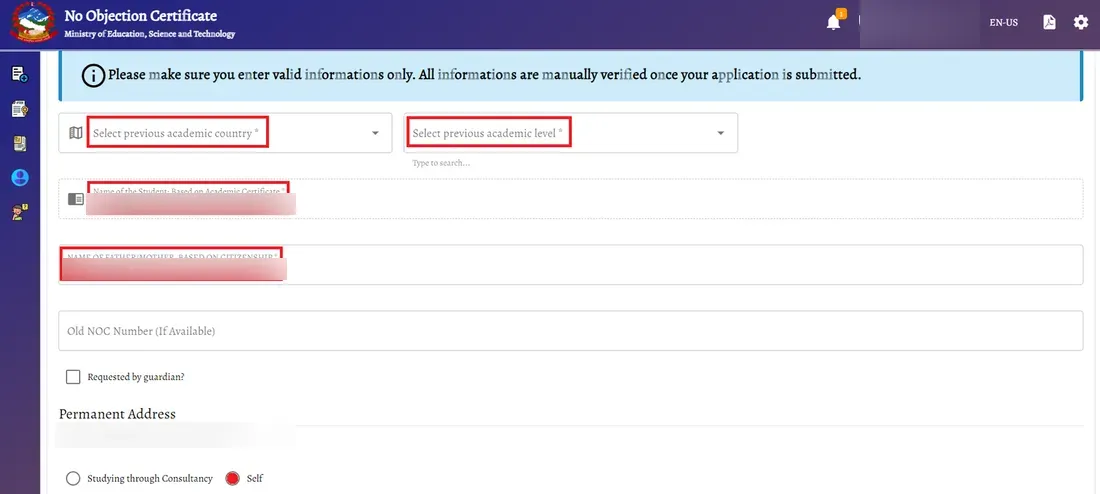
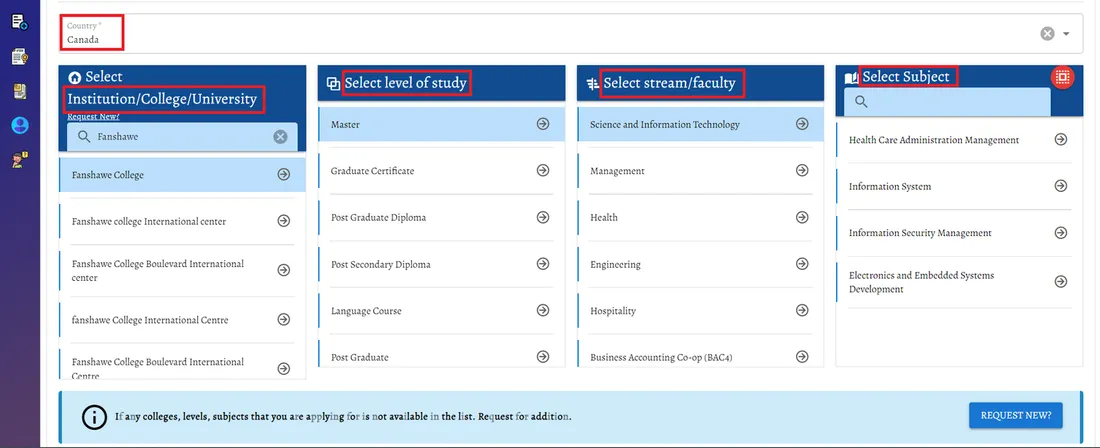
Step 6: Previous study and study plan
Pick the country and level of your previous study, then your destination country, institution, level and subject. If your institution is missing from the list, use Request New; the NOC team checks it and adds it, which can take a few days.
Step 7: Upload your documents
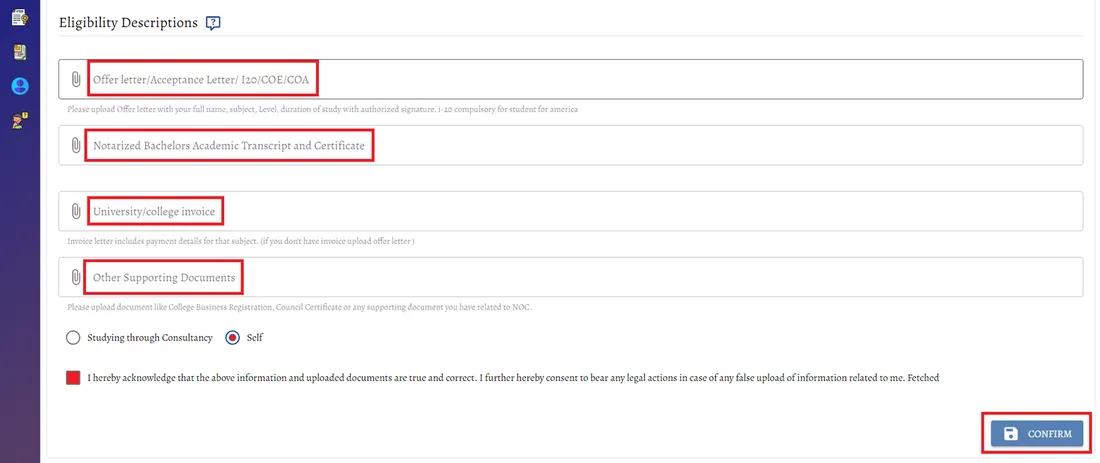
Upload the documents for your level from the table above: offer letter or I-20/COE, transcripts and certificates, invoice, and any licence or equivalence letter. Select Self or Studying through Consultancy, tick the declaration and click Confirm.
Step 8: Review and submit
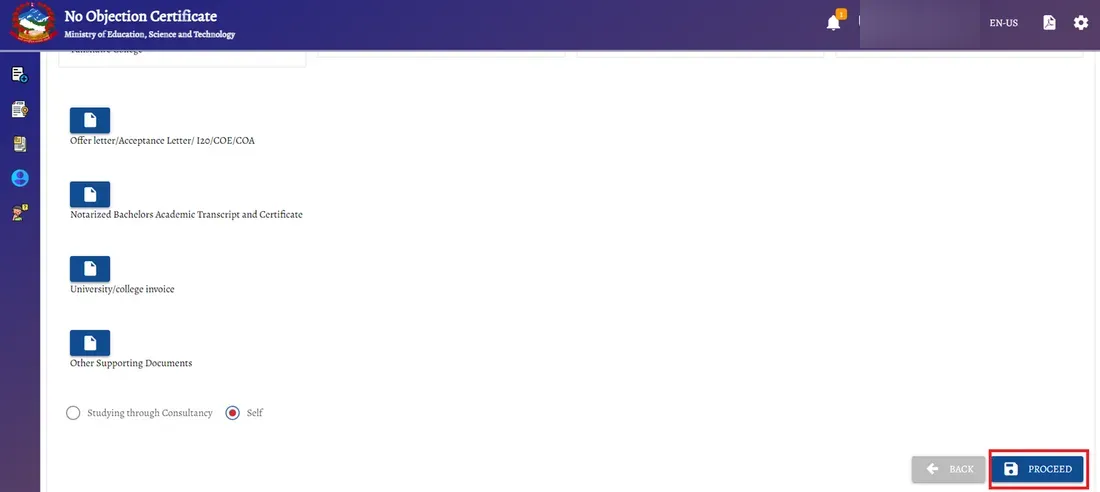
Go over every detail carefully, because you can't edit the application once it's submitted. Click Proceed, then download the form for your records.
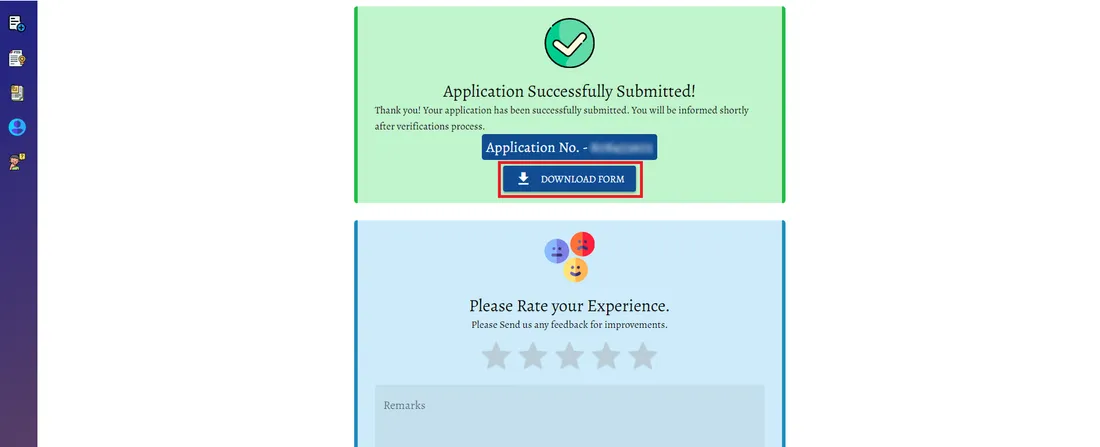
NOC login, status check and fee
Log in: on noc.moest.gov.np, click Login and enter your mobile number and password.
Check your status: open My NOC in the menu. A fresh application shows Not Seen / Waiting Verification.
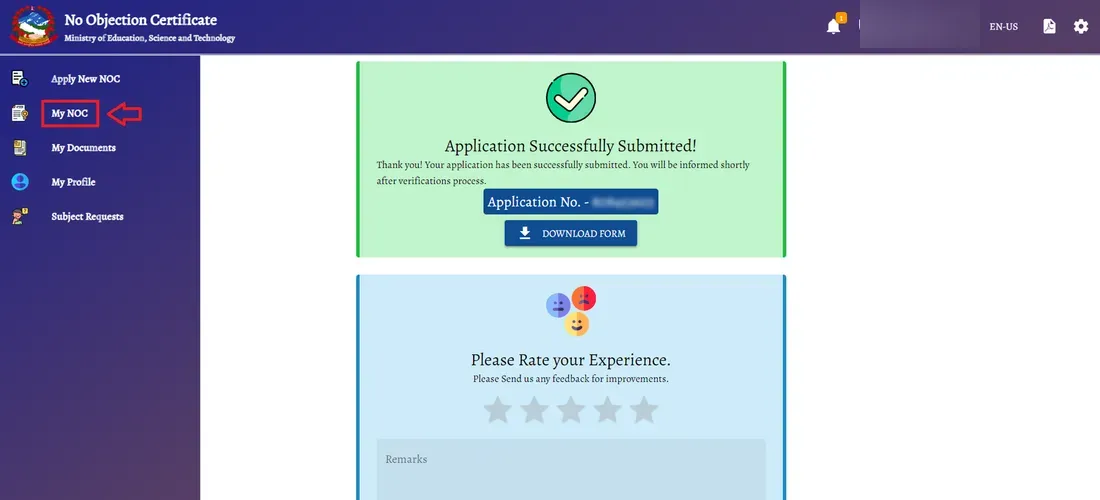
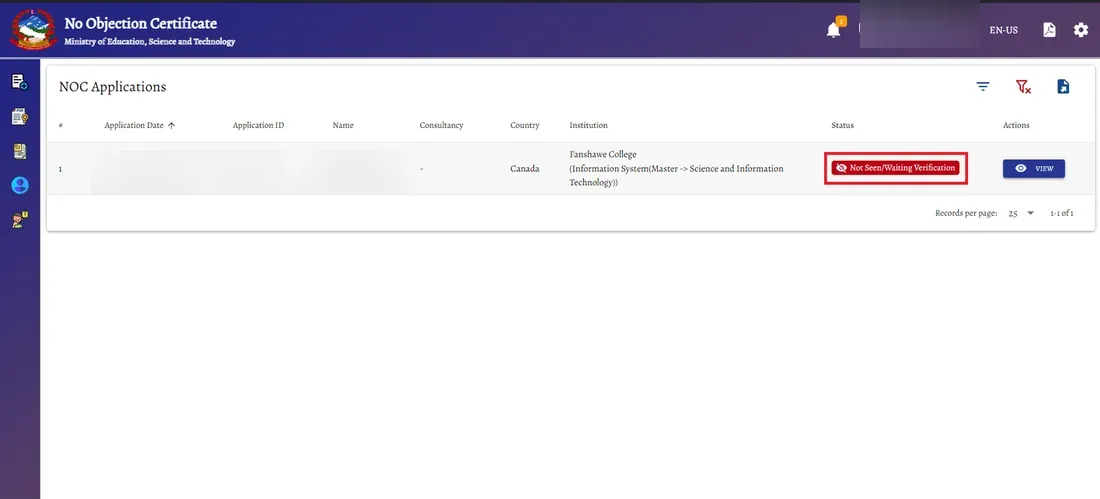
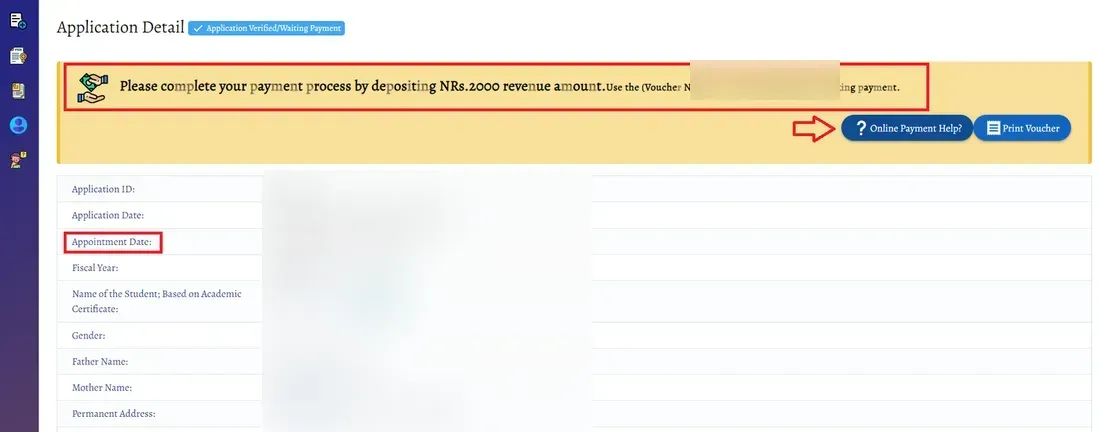
Pay the fee: once the status reads Application Verified / Waiting Payment, open the application and pay the NRs 2,000 revenue fee with the voucher number shown. Onlinekhabar's reporting likewise describes students being asked for Rs 2,000 once their documents look valid (Onlinekhabar). Only ever pay the amount on your own voucher.

Download your NOC certificate: after you pay, the portal issues the NOC. Download it from My NOC and keep a copy for your bank.
NOC office: do you need to visit?
Only if your details can't be verified online; who has to go, and the office address and contacts, are in the questions below. In practice most applicants have had to go: in April 2026 the Kathmandu Post reported that of everyone who had applied since online NOCs began in May 2023, 74% had to visit the branch, mostly because of mistakes or missing documents (The Kathmandu Post, 28 April 2026).
People still search for "Keshar Mahal NOC" or the "NOC office in Kathmandu", but the portal gives Sanothimi, Bhaktapur as the office address.
Pay only the official fee
In June 2025 Onlinekhabar reported students being made to pay bribes of up to Rs 100,000 at the NOC branch to get their applications through (Onlinekhabar), and the ministry's 2026 notice warns consultancies not to mislead students. Don't pay anyone extra to "speed up" your NOC; use the portal and the official contacts.
Why NOC applications get delayed or rejected
- Your details don't match. Even a small spelling difference between your citizenship, certificates and form means a visit for physical verification.
- A licence or pre-approval is missing for nursing, medicine or another regulated subject.
- You picked the wrong institution. Choose the exact campus named on your offer letter.
- Your scans are blurry or over 5 MB.
Frequently asked questions
What is the full form of NOC?
What is the NOC meaning in Nepali?
How do I apply for NOC online in Nepal?
What is the NOC fee in Nepal?
Can I apply for NOC with an Ncell number?
How do I check my NOC status?
Do I need to visit the NOC office in Sanothimi?
Where is the NOC office?
Can I get a NOC for a language course?
Which courses can't get a NOC?
Do I need a new NOC if I change university?
Next steps: heading to the USA or Canada? See the WES application guide and what a WES evaluation costs. Going to the UK? Read the UK student visa from Nepal guide.
Sources: NOC portal, Ministry of Education and Sports (FAQ, notices, contacts; checked 6 November 2026) · Edusanjal: NOC goes fully online, 19 April 2026 · The Kathmandu Post, 28 April 2026 · The PIE News, 7 April 2026 · Onlinekhabar, June 2025